
Updates from July
Alan Mathieson, CTO - 24 August 2026 Series: Building the Backbone
Festivals don't run on authors alone. Behind every event there's a driver, a steward on the door, someone on sound and someone checking the seating plan, and very often those are the same few people wearing different hats across the weekend. July's release was about modelling that honestly: who can do what, when they're free, and how long a job really takes.
One Person, Many Jobs
Until now, a person's role decided both what they could see in Planner and which jobs they could be scheduled for. That's fine until your best driver also happily stewards on a Saturday afternoon, at which point you'd have ended up with two records for the same human.
Every person now has one Role Type, which governs what they see, and a new Also Can Do list, which governs the crew jobs they can be scheduled for. A driver who stewards appears in both the Driver Schedule pool and the Event Staff front-of-house pool, from a single record.
Anyone rostered in Event Staff now sees those events on My Events too, alongside any author or chair commitments, so the crew's own view of their weekend is complete.
Why it matters: duplicate people are how data quietly goes wrong. One record per person means one phone number, one email and one set of stays to keep right.
Knowing When People Are Free
Per-person availability. Open anyone from the People master sheet and choose Set availability to get a grid of festival dates by hour. Click or drag to mark the hours they can't work. Everyone is presumed available unless you say otherwise, and availability is kept per edition, so last year's school run doesn't haunt this year's rota.
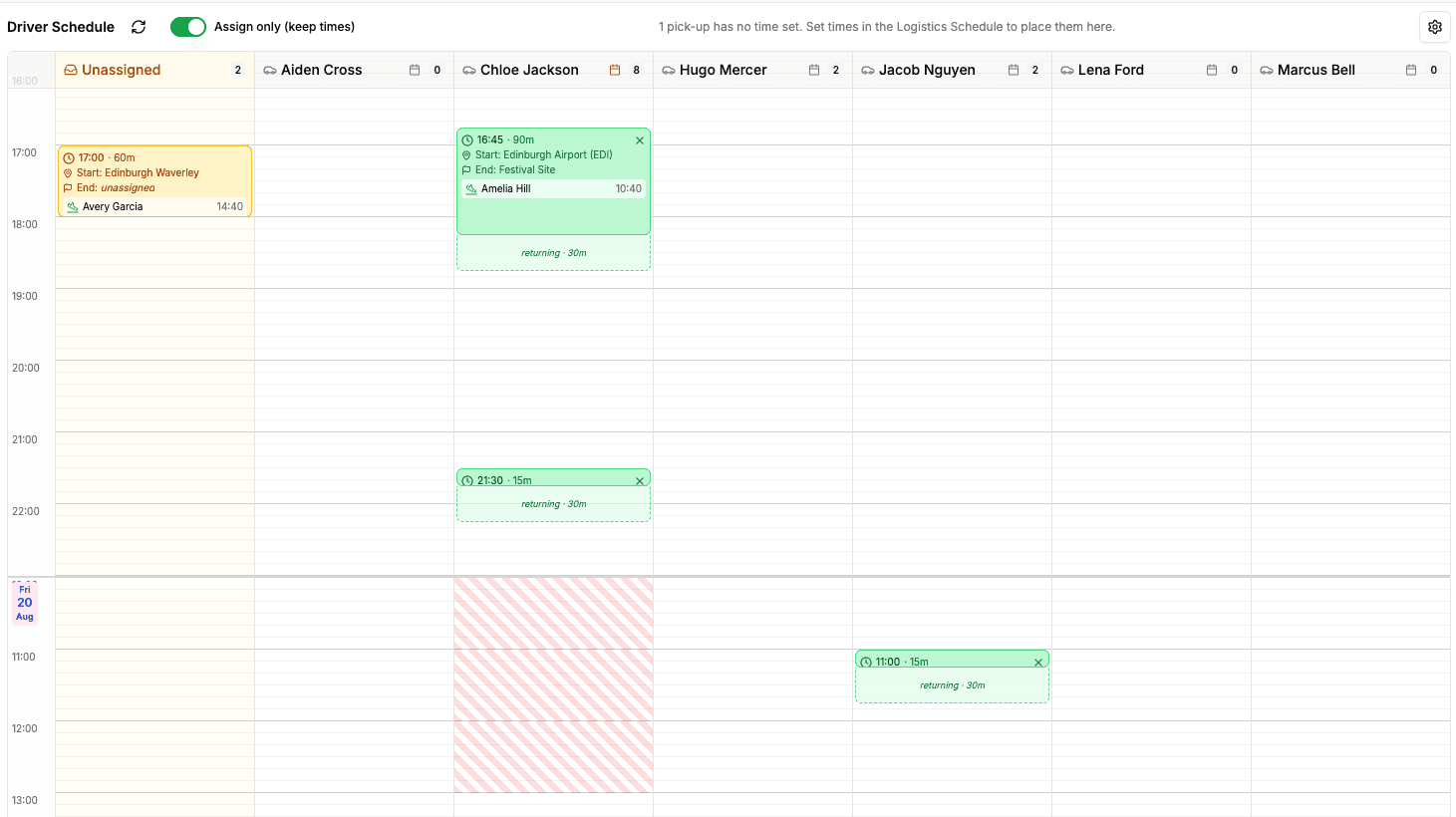
Availability on the Driver Schedule. Each driver's column now shows hatched bars over the hours they're unavailable. Drop a run there anyway and you'll get a gentle warning, never a hard block. Operations always keeps the final call.
The return journey. A driver who drops an author at the station isn't free the moment the car door shuts. Every pick-up run now shows a faded "returning" band after the drop-off, set per run, so back-to-back runs stop looking possible when they aren't.
Smarter clash detection for crew. Event Staff clashes now use the padded window around each event, set-up and pack-down included, rather than the bare start and end times. A steward on the door for one event correctly clashes with setting up the next one in the same slot.
Counting the Miles
Many festivals now report on their environmental impact, and the numbers usually come from a spreadsheet someone assembles in a hurry afterwards.
Each edition now has a CO₂ report: a CSV download with total distance, estimated kilograms of CO₂ and a breakdown by pick-up run. Enter a round-trip distance on each run and the rest is done for you. It's deliberately narrow for now, covering driving only, but it lives in a place where venue power, catering and the rest can join it later.
Why it matters: the data is already in Planner because the runs are planned there. Reporting on it shouldn't be a separate project.
Fewer Duplicates, Clearer Imports
A New Person dialog that checks first. Adding someone now looks for existing records by name and email as you type. If they were at last year's festival, Planner suggests bringing them across rather than starting again.
Import errors you can actually read. When a spreadsheet import can't be completed, the reasons now stay on screen in the import dialog, grouped and ready to copy, instead of flashing past in a notification. Columns we can't import yet are flagged before you upload, not after.
A heads-up on image quality. Upload a photo that's too small or heavily compressed and Planner will say so. It never blocks the upload; it just saves you discovering it when the brochure proof comes back.
The Quiet Work
- Automatic sign-out after 30 minutes of inactivity, with a minute's warning and a "Stay signed in" button. Work in one tab keeps the others alive.
- Subtitled joins Captioned, BSL and Audio Described as an accessibility flag on events.
- Media types are now a list you manage yourself, and To Print is a proper yes or no.
- Room sharing is two-way: put Ada in with Ben and Ben is in with Ada, with matching notes on both stays.
- Logistics Schedule search now finds people across every role, not just the ones ticked in the filter.
- Mobile app download links are on the Admin page, ready to share with your team.
- And in the spirit of June's tidy-up, the Social Media Images view has been retired; the download links now live on My Events.
What's Next
With crew modelled properly, the next job is making sure everything around them is exactly right: times, exports and the details that only show up at peak season. August is when festivals start leaning on the system hardest, and that's where our attention goes.
Fesutibaru is building the digital backbone of live culture, starting with book festivals. Want to see where it's going? Book a demo or get in touch at info@fesutibaru.com.