
Updates from August
Alan Mathieson, CTO - 18 September 2026 Series: Building the Backbone
August is when the autumn festivals stop planning and start doing. Programmes are locked, rotas are being built and emails are going out in their hundreds. It's the month when small inaccuracies become real problems, so most of this month's work was about being exactly right: about time, about your data, and about what people see.
Times an Hour Out: Five Fixes
This is the one I want to be upfront about. We found five places where a time you typed, say 14:00, was saved as if it were Greenwich time rather than the festival's own local time. In winter those are the same thing. In summer they're an hour apart. So every one of these was invisible under GMT and an hour out under British Summer Time.
- Importing a spreadsheet moved event times an hour later, and did it again on each re-import.
- The autoscheduler saved events an hour later than the slot it had offered you.
- Auto-offered travel meant "noon on arrival day" but saved 13:00.
- Repeating an event across the October clock change moved a 19:30 event to 18:30.
- Times in emails to authors, drivers and hotels could show in the wrong time zone, which mattered most for festivals outside the UK.
All five are fixed. Every time is now shown in the festival's own time zone, whoever is looking at it and wherever they are, and a repeated event keeps its time on the clock across a clock change.
These are now covered by 247 tests written specifically around how times are saved, including the one that matters most: editing one field on an event must never change another.
Why it matters: a festival runs on its timetable. If you can't trust the times, nothing else counts.
Your Data, Backed Up Twice
Most software companies rely on their cloud provider's backups and leave it there. Recent events have shown why that isn't enough: after strikes on Amazon data centres, Amazon has been unable to restore all of its customers' data, and some of it is gone for good. If your only backups sit with the same supplier as your data, their bad day is yours too.
So we don't rely on one supplier. Our database provider keeps its own backups, and in August we added a second, completely independent set, held with a different company on different infrastructure, in a separate account. If one supplier had a catastrophic failure, or an account were deleted or compromised, the other copy would still be there.
Here's what that looks like in practice:
- Every night we take a full backup of every festival's data, encrypted, and keep it for 30 days. A copy from the start of each month is kept for a year.
- Through the working day, seven days a week, we also take roughly hourly snapshots of your data. If something goes wrong at 3pm, we can usually get you back to just before it happened, without rolling back the work every other festival did that afternoon.
- Files and documents, such as photos and contracts, are copied every night.
Timings vary a little, so hourly is typical rather than guaranteed; what we commit to is at least one full backup every day, kept for 30 days.
Backups are only worth having if they restore, so we've rehearsed a full restore from these copies rather than assuming one would work. And we added a watchdog on yet another separate system that raises the alarm if the backups ever go quiet. A check that lives inside the thing it's checking stops when that thing stops; this one doesn't.
Why it matters: you're trusting us with years of festival history. That deserves more than one safety net, and more than one supplier.
Custom Fields in Your Emails
A festival added a volunteer voucher code to over a hundred stewards, hosts and drivers as a custom field, then found there was no way to put it into the group email telling them about it.
Now there is. Any custom field on a person can be used as a merge tag, written the way you'd naturally write it: [Volunteer Voucher Code] just works. Anyone without a value gets a blank rather than a stray tag in their email, and ordinary text in square brackets, like "[see attached]", is left exactly as you typed it.
Why it matters: custom fields are how every festival makes Planner its own. They should reach every place that saves real work, and bulk email is near the top of that list.
Seeing Who's Working
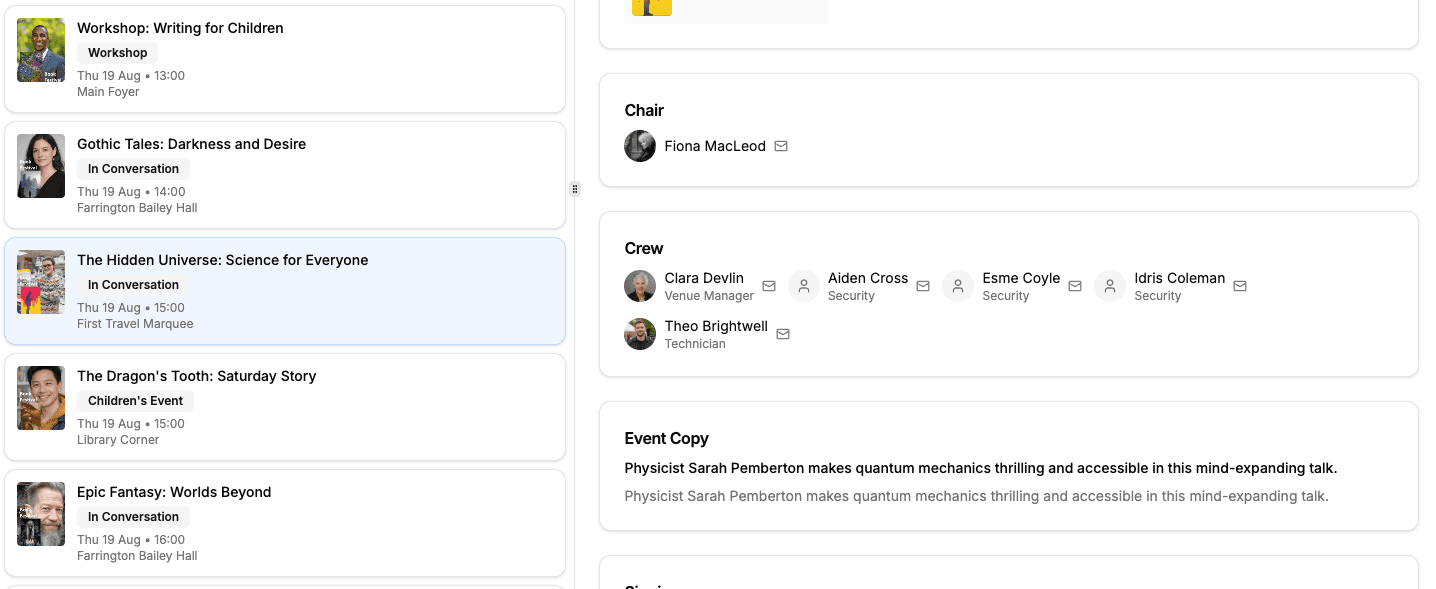
Crew on the event views. The people working an event (front of house, security, technicians) now appear on Event Listing and My Events, with the job each is doing and in your festival's own role names. Authors and publicists don't see the roster; there's no reason they should.
View As shows exactly what people see. When an administrator views Planner as someone else, they now see precisely that person's view, with nothing extra carried over from their own access. It sounds small, but it's the whole point of the feature: you can finally answer "what does a steward see?" with confidence.
The Event Staff filter sets the job. Filter to Security, assign someone, and they're down as working security on that event, as long as it's one of the jobs they're set up to do.
Spreadsheets You Can Trust
Most festivals still live partly in spreadsheets, so getting data in and out cleanly matters.
- Text survives the round trip. A line break or a quotation mark in a note or an address used to scramble the row it was in. Exports and imports now come back exactly as written, including files saved from Excel on Windows.
- Exports match the screen. Your column order, hidden columns, filter and sort are all respected, so the file you download is the table you're looking at.
- Dates sort properly in the spreadsheet you open them in.
The Quiet Work
- Travel and stays for every role: staff, technicians and PR can now be given travel and a bed, not just authors and publicists.
- Driver details on the Travel sheet now come straight from the assigned pick-up run, so there's one source of truth.
- New events pick up their venue's ticket prices when you create them, not just when you move them.
- Faster schedules: the Logistics and Driver Schedules on large festivals load noticeably quicker and drag more smoothly.
- Signing in is clearer. The most common support request is someone who can't get in because they never created an account. The sign-in page now says so up front, and the sign-up page asks for the email address the festival holds for them.
- Emails now come from info@fesutibaru.com, a real inbox, so replies reach a person.
- A crash on the My Accommodation views for anyone with a booked stay is fixed.
What's Next
September is peak season, and we'll be alongside festivals as they run. The work now is listening: to what's slow, what's missing and what nobody thought to ask for until the doors were open.
Fesutibaru is building the digital backbone of live culture, starting with book festivals. Want to see where it's going? Book a demo or get in touch at info@fesutibaru.com.